Help / overview
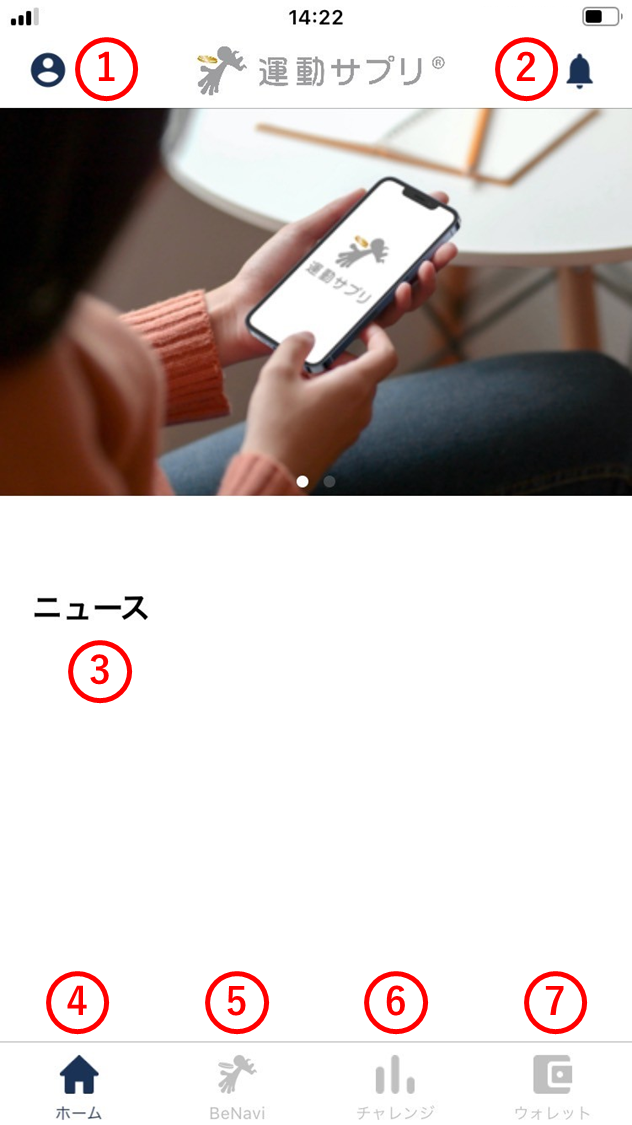
Screen anatomy
(1) Settings
Screen anatomy
(1) Settings
- Shows the user information registered with ESPL.
- Shows the app settings.
- Provides access to the address book.
- Lets you check the security settings.
- Provides access to the help / support page.
(2) Notifications
- Receives notifications about challenges you’ve joined.
(3) News
- Receives news from the ESPL team.
(4) Home
- Tap to return to the ESPL home screen.
(5) BeNavi
- Ask questions about how to use ESPL.
- Works as in-app help.
(6) Challenges
- Tap to join a challenge.
- Lets you review the history of challenges you’ve joined.
(7) Wallet
- Lets you check the crypto-assets and tokens you hold.
- Lets you review past transaction history.
- Lets you send and receive crypto-assets and tokens.